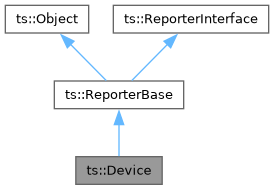
Base class for devices, files, or sockets which can work in non-blocking mode.
The methods from this class should not be used by applications. They should be used only by "reactive classes", which work in combination with an event dispatcher.
The exact meaning of "non-blocking" depends on the type of device and the operating system. This is why this class shall be used by specialized classes which exactly know what they are doing.
There are two distinct non-blocking I/O models:
- Immediate I/O (UNIX).
- Asynchronous I/O (Windows).
Differences in semantics:
- On UNIX systems (Linux, macOS, BSD), non-blocking means that a read or write operation fails if it cannot be immediately served. The corresponding error is EAGAIN. A non-blocking I/O immediately succeeds or fails.
- On Windows systems, non-blocking means using "overlapped" I/O. For anyone with a basic system culture, this means "asynchronous" I/O. An asynchronous I/O operation can either immediately succeed or fail with error ERROR_IO_PENDING, meaning that the operation executes in the background.
Differences in usage:
- Execution logic: On UNIX systems, an event dispatcher notifies the applications when an I/O may be "possible". When notified, the application shall repeatedly read or write all possible data, until an EAGAIN error indicates that no more I/O is immediately possible. On Windows systems, the application starts an I/O and control immediately returns. The I/O data exchange continues in the background. The event dispatcher notifies the application when the I/O completes.
- Data buffer usage: On UNIX, an I/O is either immediate or failed. On Windows, the I/O is in progress as long as it is not completed. This means that, on Windows, I/O buffers which are used for read or write must be available during the asynchronous phase of the I/O, because the data can come in or go out at any time. On UNIX systems, on the contrary, no buffer is used while waiting for some I/O to become possible.
Important differences in canceling I/O and closing file descriptors or handles:
- On UNIX, a non-blocking I/O is either immediate or failed. No I/O is ever "in progress". Closing a file descriptor is possible at any time without restriction.
- On Windows, a pending I/O can be canceled either explicitly or as the result of closing the device handle. In that case, the I/O completion is notified later with an I/O error status. This means that the I/O data buffer and IOSB (see below) shall remain valid as long as this corresponding I/O completion has not been received. It is of the utmost importance that the application keeps track of all pending asynchronous I/O and always waits for the reception of all corresponding I/O completions before releasing the memory for the data buffers, including when closing the device handle.
Get the underlying file descriptor or device handle. This method is reserved for low-level operations and should not be used by normal applications.
On UNIX systems, sockets are standard file descriptors. On Windows systems, sockets and devices handles are two distinct types (SOCKET, an integer type, and HANDLE, a pointer type). However, SOCKET and HANDLE have the same size and can be converted between each other. In practice, all Windows device handles are pointers. When Microsoft decided to implement the BSD socket API, they needed to represent sockets as integers. The integer is simply a cast of the HANDLE pointer.
In practice, the methods getHandle() and getSocket() return the same value, represented as two different portable types, SysHandleType and SysSocketType. Note that this types are defined as their real representation. On UNIX systems, both are defined as int and are compatible. However, on Windows systems, they are defined as HANDLE and SOCKET and are not compatible. So, accidentally mixing the two compiles on UNIX but not on Windows. Be careful to use the right type for the right usage.
There is one important difference between getHandle() and getSocket(): the error values, SYS_HANDLE_INVALID and SYS_SOCKET_INVALID. Be careful, these constants have distinct binary values on Windows. This is the only case were it is not possible to cast between a SysHandleType value and a SysSocketType value. This is why it is recommended to always use getHandle() when a SysHandleType is required and getSocket() when a SysSocketType is required.
A subclass which uses file descriptors or device handles for read, write, or both, must override the methods getReadHandle(), getWriteHandle(), or both. If the two types of operations use the same file descriptor, the two methods must return the same value.
An application should call getReadHandle() for read operations and getWriteHandle() for write operations. The method getHandle() returns getReadHandle() if its returns a valid value, and getWriteHandle() otherwise.
- Returns
- The underlying file descriptor or device handler. Return SYS_HANDLE_INVALID if the socket is not open.
| bool ts::Device::setSystemNonBlocking |
( |
bool | non_blocking | ) |
|
|
protected |
Low-level method to set the system file or socket descriptor in non-blocking mode.
- Parameters
-
| [in] | non_blocking | It true, the device is set in non-blocking mode. |
- Returns
- True on success, false on error.
Summary: Do not use this method unless you exactly know what you are doing.
UNIX: Depending on the way a file descriptor is created, it may be possible to specify the non-blocking mode from the beginning. Or it can be somehow inherited. However, this is not portable.
Examples:
- On Linux and FreeBSD, a socket can be directly created in non-blocking mode using the flag SOCK_NONBLOCK in the 'type' parameter of the socket() system call. However, it does not work on macOS.
- On macOS (and maybe FreeBSD), when a server socket is in non-blocking mode, all client session sockets which are created by accept() are also in non-blocking mode. However, on Linux, they are in blocking mode.
In all cases, it is possible to set a file descriptor in non-blocking mode at any time using the method setSystemNonBlocking(). This method uses fcntl(F_SETFL) to alter the file descriptor's flags.
Windows: The natural way of not being blocked on I/O on Windows is asynchronous I/O. To increase the general confusion, there is some form of non-blocking mode on Windows sockets, and only sockets, not other forms of file handles. This mode is activated using "ioctlsocket(fd, FIONBIO, &mode)". When this mode is active, socket I/O become similar to UNIX: they immediately either succeed or fail, but never block. However, there is no way to get notified when the I/O becomes possible. There is no equivalent to epoll (Linux) or kqueue (macOS and BSD). The Windows I/O Completion Ports can only work on asynchronous I/O, using OVERLAPPED structures. Because this form of non-blocking mode is mostly useless in practice, we do not use it and the method setSystemNonBlocking() does nothing on Windows.
- See also
- https://learn.microsoft.com/en-us/archive/blogs/csliu/io-concept-blockingnon-blocking-vs-syncasync


 1.15.0